

The Zero-Bounce Outbound Engine: How to Set Up Multi-Domain Cold Email with Instantly and Clay
Master cold email domain setup with Instantly and Clay. Configure SPF, DKIM, DMARC on secondary domains, run automated warmups, and enrich B2B leads.
Educational Resource: This guide does not constitute financial or legal counsel.
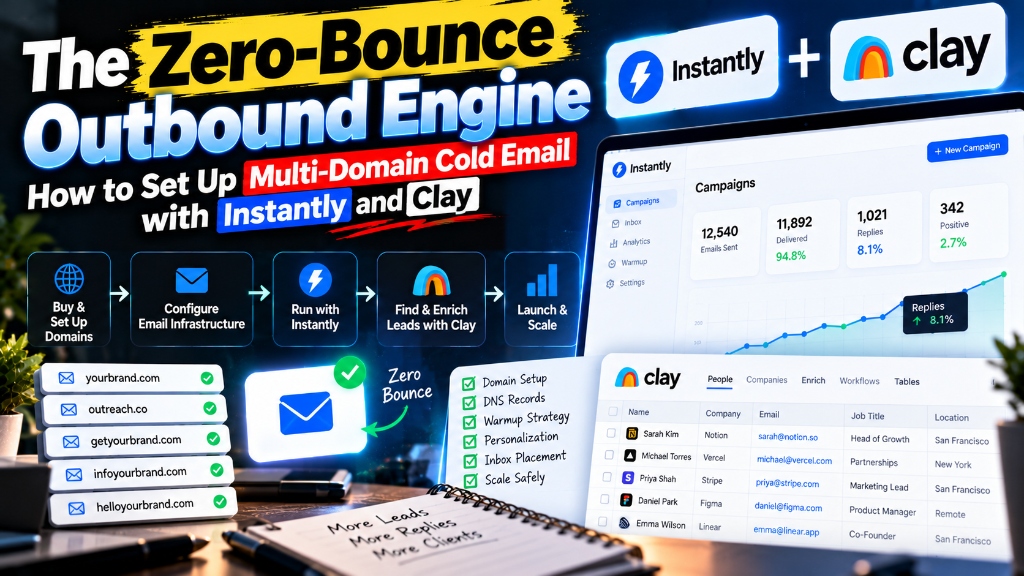
Direct Answer: A proper cold email domain setup using Instantly and Clay isolates your primary company domain by routing cold outbound volume through dedicated secondary domains. You authenticate each domain with custom SPF, DKIM, and DMARC DNS records, warm mailboxes gradually over three weeks, and use Clay to enrich and verify lead data before dispatching personalized, low-friction emails.
Cold outbound sales used to be easy: buy a scraped lead list, upload it to an email marketing tool, blast out 2,000 generic messages, and wait for responses to trickle in.
In today’s strict deliverability landscape, that outdated strategy will instantly destroy your business. Major email service providers (specifically Google Workspace and Yahoo Mail) enforce aggressive spam prevention protocols. If your domain’s spam complaint rate crosses a tiny 0.3% threshold, your entire domain is blacklisted: meaning even your daily invoices, client communications, and calendar invites start landing in the spam folder.
To survive and generate pipeline today, modern B2B founders and sales teams must deploy a multi-domain infrastructure.
Mastering a proper cold email domain setup instantly clay architecture creates an impenetrable firewall between your company’s primary corporate domain and your outbound sales engine. By pairing secondary burner domains with automated warmup software (Instantly.ai) and AI-driven waterfall data enrichment (Clay.com), you achieve inbox delivery rates exceeding 85% while prospecting completely safely.
Here is the exact technical blueprint to configure your DNS records, run your warmup protocol, enrich verified lead lists, and craft outbound messages that consistently book calls.
The Death of Single-Domain Outreach: Why Your Primary Domain Must Stay Protected
Conducting cold outbound campaigns directly from your primary corporate domain risks catastrophic reputation damage and permanent operational blacklisting.
Your primary business domain (e.g., company.com) is the lifeblood of your operation. It hosts your website, routes mission-critical customer support tickets, and manages confidential communications with investors and existing clients. When you fire hundreds of cold emails from that primary domain, recipients will inevitably mark some messages as spam.
- Flawed Architecture: Primary Domain (company.com) ➔ Cold Outbound ➔ Spam Flagged ➔ Client Invoices Land in Spam (Disaster).
- Resilient Multi-Domain Architecture: Primary Domain (company.com) Protected ➔ Dedicated Secondary Domains (getcompany.com, trycompany.co) Handle All Outbound Volume.
Once Google or Microsoft tags company.com as a source of unsolicited mail, rehabilitating your domain reputation can take six to twelve months of grueling technical appeals.
By purchasing separate, lookalike secondary domains (such as trycompany.com, getcompany.co, or usecompany.io) and redirecting their web traffic back to your primary site, any potential spam flags are absorbed entirely by disposable secondary assets, leaving your main brand pristine.
Setting Up Secondary Domains: DNS Records (SPF, DKIM, DMARC) in 20 Minutes
Configuring DNS authentication through SPF, DKIM, and DMARC records tells recipient mail servers that your outbound emails are legally authorized and not spoofed phishing attacks.
When you purchase three to five secondary domains on a registrar (such as Cloudflare or Namecheap), you must establish three distinct authentication records in your domain’s DNS manager before sending a single message:
| DNS Record Type | DNS Host / Name | Record Value / Configuration | Primary Deliverability Function |
|---|---|---|---|
| SPF (Sender Policy Framework) | @ or root | v=spf1 include:_spf.google.com ~all | Specifies the exact IP addresses and servers permitted to send email from your domain |
| DKIM (DomainKeys Identified Mail) | google._domainkey | Cryptographic 2048-bit public TXT string from Google Admin | Attaches an invisible digital signature to every email header, proving the content was not altered in transit |
| DMARC (Domain-based Message Authentication) | _dmarc | v=DMARC1; p=quarantine; rua=mailto:dmarc@yourdomain.com | Dictates how recipient servers should handle emails that fail SPF or DKIM checks |
| Custom Tracking Domain (CNAME) | inst or track | prox.itrackly.com (pointed to Instantly) | Replaces generic third-party tracking links with your own custom branded URL for open and click tracking |
Never manage DNS directly through budget domain registrars. Transfer your nameservers to Cloudflare: its global edge network propagates DNS changes in under two minutes, eliminates TTL caching delays, and prevents authentication misconfigurations.
Once these TXT and CNAME records are deployed, verify them using tools like MXToolbox or Instantly’s built-in DNS health checker to ensure all four authentication indicators show green checkmarks.
The 3-Week Warmup Protocol: Setting Sending Thresholds and Reply Rates in Instantly
The three-week warmup protocol trains email provider spam filters by gradually ramping up positive engagement and simulated conversational replies across your mailboxes.
Email algorithms evaluate new inboxes with intense suspicion. If a domain created yesterday suddenly fires off 100 emails on day two, spam filters instantly flag the behavior as a bot attack.
By connecting your mailboxes to Instantly.ai, your accounts enter a private, peer-to-peer network where thousands of verified mailboxes automatically exchange emails with one another, open them, star them, and pull them out of the spam folder if they land there.
- Week 1: 5 to 8 warmup emails daily through 100% peer warmup network (zero cold prospects contacted).
- Week 2: 12 to 18 emails daily (70% warmup / 30% cold outreach) while monitoring deliverability metrics.
- Week 3 and Beyond: 25 to 30 total emails daily per mailbox maximum (50% warmup / 50% live outbound) for optimal inbox health.
Optimal Instantly Warmup Settings for 2026:
- Daily Warmup Limit: Set to 20 to 25 emails per mailbox maximum.
- Warmup Ramp-Up Speed: Increment by 2 emails per day until the ceiling is reached.
- Target Reply Rate: Set the reply slider to 30% to 35% inside Instantly. A high reply rate signals to Google and Microsoft that your emails generate genuine two-way conversations.
- Keep Warmup Running Forever: Never turn off the warmup feature even when live campaigns are running. Maintaining a 50/50 ratio of warmup emails to live outbound ensures your sender score remains resilient during volume spikes.
Prospect Enrichment with Clay: Finding Verified Work Emails and Trigger Events
Clay transforms static prospect lists into dynamic, verified outreach campaigns by chaining multiple data providers together in an automated waterfall enrichment table.
Most cold email campaigns fail because their data is stale. If you upload a standard Apollo lead export directly into an email sequencer, 15% to 25% of the email addresses will bounce: immediately destroying your new domain’s sender reputation.
Clay.com solves this through Waterfall Data Enrichment:
- Import Clean Company Data: Pull targeted accounts from LinkedIn Sales Navigator or job boards.
- Waterfall Email Verification: Instead of relying on a single database, Clay queries multiple verification tools sequentially (such as Findymail, Dropcontact, Hunter, and Prospeo). If Tool A cannot find a valid work email, Clay queries Tool B, and so on.
- Catch-All Email Verification: Run every email through an email validation engine (like NeverBounce or Debounce) to filter out risky catch-all addresses. If an email cannot be 100% verified, Clay automatically drops it from the send queue.
- Enrich Relevant Trigger Events: Use Clay’s AI formulas to scrape company news, recently posted job openings, executive hiring announcements, or specific technologies installed on the prospect’s website (e.g., “Show me Shopify Plus merchants using Klaviyo who hired a Head of Growth in the last 60 days”).
Writing Short, Frictionless B2B Copy That Gets Replies in 2026
Modern cold emails must be short, hyper-relevant, and designed around low-friction interest calls-to-action rather than demanding immediate 30-minute meetings.
Nobody wants to read an eight-paragraph sales pitch on their phone between meetings. The highest-converting cold emails in 2026 follow a strict 4-part framework and stay under 75 total words:
The 4-Part Low-Friction Email Architecture
- Contextual Observation (No Creepy Fluff): State a verifiable business trigger that makes the email relevant right now.
- The Problem / Insight: Highlight a specific, expensive friction point your prospect likely faces.
- The Proof Asset: Share a concise, one-sentence case result or metric achieved for a similar peer company.
- The Frictionless CTA: Ask for interest, not a calendar commitment.
High-Converting Email Template
Subject: [Company Name] + [Specific Workflow]
Hi [First Name], noticed you recently expanded your enterprise sales team in Chicago.
When most B2B agencies scale outbound to 10+ reps, domain deliverability typically drops below 70%, silently routing reps’ follow-ups into spam.
We built a multi-domain architecture that keeps inbox placement at 92%+ for teams like [Client A] and [Client B].
Worth sending over a 2-minute video showing the technical setup?
Why this works: It takes 15 seconds to read, identifies an immediate pain point, offers an asset, and ends with a polite question that requires a simple one-word reply.
Key Metrics Tracker: Monitoring Domain Health and Spam Complaint Ratios
Maintaining outbound deliverability requires continuously tracking leading metrics to catch technical degradation before mailboxes are blacklisted.
Set up a weekly review to audit the health of your multi-domain outbound engine:
| Key Performance Metric | Healthy Target Benchmark | Danger Zone (Take Immediate Action) | Corrective Protocol |
|---|---|---|---|
| Hard Bounce Rate | Below 1.5% | Above 2.0% | Immediately pause campaign; re-run all lists through Clay’s waterfall verification |
| Spam Complaint Rate | Below 0.1% (1 per 1,000 sent) | Above 0.3% | Stop sending from affected domain; review copy relevance and prospect targeting |
| Email Open Rate | 60% to 85% | Below 45% | Check custom tracking domain CNAME; verify DKIM records; run spam trap test |
| Positive Reply Rate | 3% to 8% | Below 1.0% | Rework value proposition and call to action; refine target ICP qualification |
Frequently Asked Questions
How many secondary domains should I buy for cold email?
Most solopreneurs and small sales teams should purchase three to five secondary domains, creating two Google Workspace or Microsoft 365 user mailboxes per domain to distribute sending volume evenly.
How many cold emails can I safely send per day from one inbox?
You should send no more than 25 to 30 live cold emails per day from a single mailbox (in addition to 20 to 25 background warmup emails) to maintain top-tier sender reputation.
How long does it take to fully warm up a new cold email domain?
A new domain requires a minimum of 14 to 21 consecutive days of automated warming inside Instantly before dispatching the first batch of live cold outbound emails.
What is the best domain registrar for cold email?
Cloudflare and Namecheap are the best domain registrars for cold email because they support fast DNS propagation, free WHOIS privacy, and easy nameserver management.
Should I use Google Workspace or Microsoft 365 for cold email mailboxes?
Both platforms deliver excellent results, but Google Workspace generally offers slightly higher deliverability rates when sending to other Google-hosted corporate recipients, while Microsoft 365 performs exceptionally well when targeting enterprise corporate environments.
Final Thoughts: Treat Outbound as Mission-Critical Infrastructure
Cold outbound is not an aggressive numbers game: it is an engineering discipline.
Attempting to scale sales using a single unauthenticated mailbox and messy lead lists will inevitably destroy your brand reputation and leave your sales pipeline bone-dry.
By deploying a disciplined cold email domain setup instantly clay architecture, you protect your primary business assets, insulate yourself from algorithmic spam updates, and build a predictable, automated revenue pipeline.
Secure your three secondary domains today, configure your DNS records in Cloudflare, connect your mailboxes to Instantly, and let your warmup engine build the foundation for your next quarter’s growth.
Download: The Solo Founder's High-Margin Scaling Playbook
A battle-tested blueprint on building asymmetric leverage, packaging high-ticket B2B services, and converting labor into scalable digital products.
- Pricing power & contract negotiation scripts
- Micro-SaaS & digital product launch checklist
This article and its associated calculators are for educational and informational purposes only and do not constitute financial, investment, legal, tax, or medical advice. We may earn an affiliate commission on third-party links at zero cost to you. Always consult a licensed professional before making major financial, health, or investment decisions. Read our full Legal & Financial Disclaimer.
Vikram Nair
Verified AuthorVikram covers small business ideas, digital ventures, and practical company growth. Having worked alongside early-stage founders, he writes straightforward advice on building profitable businesses.
Was this essay valuable to you?
Help us refine our editorial focus and research priorities.
Reader Discussion (2)
Extremely well-articulated analysis on capital compounding. The breakdown on equity allocation vs active income is spot on.
The distinction between looking rich and building real moats is something more founders need to study deeply.
Explore Eternity Empire
Search empirical insights, explore our four wisdom categories, and discover curated strategic essays.
Search Insights
Recent Essays
The Backyard Cash Flow Engine: How to House Hack with an ADU in 2026
11 min read • Oct 20How to Become a Fractional COO: Landing Your First $5,000/Month Retainer Client
12 min read • Oct 20The Frugality Ceiling: Why Cutting Lattes Caps Out and How to Shift to an Earning Expansion Mindset
11 min read • Oct 20Featured Guides
Further Wisdom & Insights
Explore All Articles
How to Buy a Micro-SaaS on Acquire.com: A Non-Technical Buyer’s Playbook for $500 MRR Apps
Learn how to buy a micro SaaS on Acquire.com without coding. Master non-technical due diligence, Stripe audits, LOI structuring, and escrow closings.

Wise vs. Revolut Business: Which Account Saves Global Freelancers the Most on FX and Transfer Fees?
Compare Wise vs Revolut Business for international freelancers. Analyze exchange rate markups, SWIFT wire costs, weekend FX fees, and accounting sync.

When to Elect S-Corp Status for Your LLC: The $80,000 Profit Rule and Reasonable Salary Math
Discover when to elect S-Corp for single member LLC status. Learn the $80,000 net profit threshold, reasonable salary rules, and Form 2553 filing deadlines.